Are you Resident or Zoe’s Club member? Would you like to change the yellow Resident icon or the Zoe’s star next your username? Well if you answered yes to either question then this post is for you! Follow these three easy steps to change your icon:
Step #1 – Go to Account Settings > User Settings
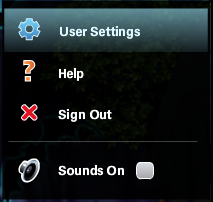
Go to the top right corner of your screen, select “Account Settings” and then click on the option “User Settings”
Step #2 – Choose Change Icon
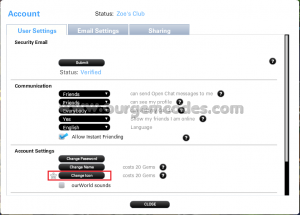
A new tab will open. Chose the option “Change icon” right under the option “Change name”
Step #3 – Select a Name Icon
Then you will see a tab with all the icons that you can change to. Zoe’s Club members can change their icon to a colorful one (check the picture below). Residents will be able to choose the same icons but instead of colored their will be black and white.
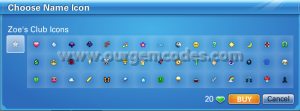
Keep in mind that Ourworld will charge you 20 gems for changing icon and the icon will leave by the time your Residency or Zoe’s Club membership ends. If you become Resident or Zoe’s Club member again in the future you will not have the icon from last time.